


Sleeping inside a vehicle requires optimal conditions, and nothing ruins a night of rest faster than a glaring 15-inch touchscreen illuminating your entire cabin like a stadium floodlight. From our experience outfitting thousands of electric vehicle owners for overlanding and road trips, figuring out how to turn off the lights in Tesla's camping mode is consistently the most common hurdle new owners face. Tesla software provides incredible utility for outdoor adventures, keeping you warm in winter and cool in summer, but its user interface famously lacks a simple, single-touch button to instantly black out the interior screens.

We recommend approaching this vehicle quirk with a combination of software knowledge and practical physical workarounds. In this comprehensive industry guide, we deliver direct, practitioner-level advice on managing your vehicle's illumination, ensuring you achieve the dark, restful environment necessary for a successful off-grid trip. Whether you are sleeping in the trunk or inside a connected shelter, mastering how to turn off the lights in Tesla's camping mode is essential for your comfort and battery efficiency.
Quick Answer: How to turn off the lights in Tesla's camping mode
To successfully turn off the lights in Tesla's camping mode, you must follow these exact operational steps:
- Main Touchscreen: You cannot turn the screen off instantly through software. You must wait 10 to 15 minutes without touching the display or opening any doors. The glowing campfire animation will automatically transition into a dim, black screensaver.
- Ambient & Puddle Lights: Lock the vehicle doors from the inside by tapping the lock icon at the top of your center screen. This forces the ambient floorboard and footwell lights to shut down immediately.
- Dome Lights: Press the physical overhead ceiling lights with your finger to manually turn them off, or navigate to Controls > Lights > Dome Lights > Off.
Table of Contents
What It Is: Understanding Camp Mode
Camp Mode is a specialized software feature that transforms your vehicle into a climate-controlled, mobile cabin. When activated, the car maintains your desired temperature, keeps the 12V and USB outlets powered for charging devices, and completely disables the Sentry Mode alarm and walk-away door locks so you can move around inside without setting off sirens. However, the system assumes you want a cozy, romantic ambiance, displaying a glowing virtual campfire on the main console.
Because the manufacturer designed this as an interactive entertainment feature rather than a strict sleeping tool, learning how to turn off the lights in Tesla's camping mode requires understanding the car's automatic sleep cycles. The vehicle treats the cabin as "occupied and active" until a prolonged period of physical inactivity triggers the display to sleep.
How It Works: The Sleep Timer
When you activate this setting from your climate menu, the vehicle's computer enters a sustained idle state. To turn off the lights in Tesla's camping mode, you must allow the car's internal inactivity timer to run its course. Every time you tap the screen, shift your weight heavily in the driver's seat, or open a door, the 10 to 15-minute countdown timer resets.
Locking the doors from the central display immediately kills the ambient interior lighting. If you want to fully turn off the lights in Tesla's camping mode, patience is your only software-based solution. Once the timer expires without interruption, the screen will drop to a pitch-black background displaying only faint text reminding you to tap to wake.
Benefits of a Dark Cabin
Why should you care about how to turn off the lights in Tesla's camping mode? First and foremost is sleep hygiene. Even a low-level glow from an LCD screen disrupts melatonin production, preventing you from reaching deep REM sleep cycles. When you are parked in a remote location preparing for a long day of driving, poor sleep is an unacceptable safety hazard.
Secondly, stealth and privacy are paramount. When you turn off the lights in Tesla's camping mode, you stop broadcasting your presence to everyone else at the campsite, rest stop, or RV park. A glowing interior acts as a beacon, drawing unwanted attention to your vehicle. Finally, battery conservation is key. While the screen draws minimal high-voltage power compared to the HVAC compressor, every watt counts during a multi-day off-grid excursion. In our testing, maintaining a completely dark cabin prevents unnecessary 12V power drain and ensures you wake up with maximum range.
Limitations and Software Quirks
The primary limitation is the distinct lack of a manual override button. The inability to instantly turn off the lights in Tesla's camping mode frustrates commercial users, frequent campers, and weekend warriors alike. If you wake up at 3:00 AM to use the restroom, the simple act of opening the door wakes the vehicle's computer, activates the puddle lights, and turns the main screen back to full brightness. You then have to climb back into your sleeping bag and wait another excruciating 15 minutes for the system to sleep.
Furthermore, if you leave your exterior headlights set to "Auto," unlocking the doors from the inside can cause the exterior headlights to flash brilliantly into the night, potentially blinding your neighbors or violating campsite etiquette. You must proactively manage these settings before your head hits the pillow.
Who Should Use It
We recommend mastering this setup for anyone executing a genuine overnight stay inside the vehicle or utilizing an attached shelter. If you are sleeping on a Tesla Camping Air Mattress, you absolutely need to turn off the lights in Tesla's camping mode to get adequate rest. It is also an essential skill for parents traveling with young children who require total, uninterrupted darkness to fall asleep and stay asleep.
Who Does Not Need It
If you are merely resting at a supercharger for 30 minutes while watching Netflix, worrying about how to turn off the lights in Tesla's camping mode is a waste of time. Similarly, if you do not need the 12V outlets to run a CPAP machine, a portable refrigerator, or charge laptops overnight, you can bypass this feature entirely. Instead of Camp Mode, you can use the "Keep Climate On" setting. When you use "Keep," the screen shuts off instantly the moment you lock the doors from the back seat. However, this disables power to your auxiliary ports.
Common Mistakes to Avoid
In most professional situations, we see users making the same repetitive errors when trying to achieve a pitch-dark cabin.
- Using Screen Clean Mode: Many users mistakenly think selecting "Screen Clean Mode" is the best way to turn off the lights in Tesla's camping mode. It is a terrible workaround. While the screen image turns black, the LCD backlight itself remains powered on. This emits a noticeable, eerie gray glow all night long, and prevents the screen from ever going into its true deep-sleep screensaver mode.
- Forgetting to lock the car from the screen: If you close the doors but do not manually tap the lock icon on the screen, your footwell and ambient lights will remain illuminated indefinitely. The car assumes you are still active inside.
- Opening the Mobile App: It is incredibly tempting to check your battery percentage or adjust the climate on your smartphone while laying in the back. However, opening the app sends a ping to the car's computer, waking the system up and turning the interior displays back to full brightness, forcing you to restart the 15-minute wait.
Buying Considerations for Campers
Because the software does not allow you to instantly turn off the lights in Tesla's camping mode, you must invest in practical hardware solutions to guarantee a good night's sleep. We strongly advise purchasing custom-fit blackout window privacy shades from our Tesla Tent Accessories collection. These shades block out exterior campsite lights, insulate the glass, and hide the unavoidable 15-minute screen glow from outside observers.
For heavy-duty applications and extended road trips, expanding your livable space is crucial. Sleeping exclusively inside the cabin is comfortable, but integrating a tailored exterior shelter transforms your vehicle into a true basecamp. When you connect a specialized tent to the trunk, you can leave the tailgate open, utilizing the vehicle's climate control to heat or cool the expanded living area without feeling claustrophobic.
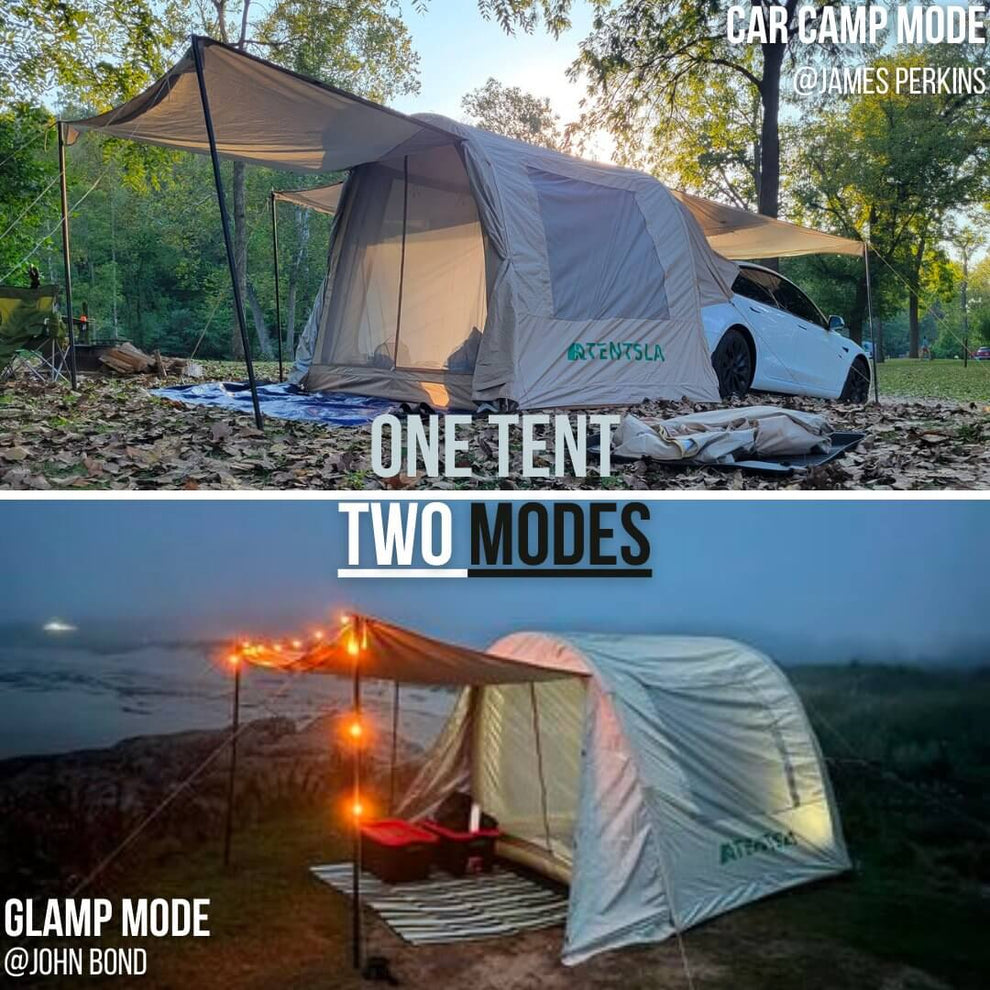
TENTSLA X1 Tesla Camping Tent
Unlike traditional camping tents, the Tentsla X1 is specifically optimized for Tesla camping lifestyles. The innovative inflatable structure allows quick deployment without complicated pole assembly, while the aerodynamic design complements Tesla vehicles perfectly.
- Fast Installation: Inflatable design deploys in minutes using your vehicle's power.
- Compatibility: Fits Tesla Model 3, Model Y, and Model X seamlessly.
- Weather-Resistant: Built with heavy-duty 210D and 420D Oxford Fabric with Silver Coating for superior UV protection and heat insulation.
- Standalone Mode: Functions as an independent glamping tent when you need to disconnect the vehicle and drive away.
Whether you're planning weekend trips, beach glamping, or cross-country mountain exploration, this is the Best Tent for Tesla Model Y owners looking to maximize their outdoor experience safely and comfortably.
Summary and Comparison Tables
| Light Source | How to Turn It Off | Time Required |
|---|---|---|
| Main Touchscreen | Do not touch the screen or open doors. Wait for the dark screensaver to engage. | 10 - 15 Minutes |
| Ambient / Footwell Lights | Lock the doors from the center display lock icon or the mobile app. | Instant |
| Dome / Ceiling Lights | Press the physical light lenses to manually toggle off, or use the Controls menu. | Instant |
| Exterior Headlights | Set Headlights to "Off" in the Lights menu before sleeping to prevent flashes. | Instant |
| Feature | Camp Mode | Keep Climate On |
|---|---|---|
| Screen Behavior | Displays campfire, turns black after 15 minutes of inactivity. | Turns off instantly when doors are locked from the rear. |
| 12V & USB Power | Remains active all night (great for CPAP or coolers). | Shuts down entirely when the car locks. |
| Sentry Mode | Automatically disabled to prevent false alarms. | Can remain active (drains high-voltage battery faster). |
| Best Use Case | Sleeping overnight, charging devices, attached tailgate tents. | Leaving pets in the car safely, short naps without charging needs. |
| Pros | Cons |
|---|---|
| Maintains consistent cabin temperature without timing out. | Inability to instantly turn off the lights in Tesla's camping mode. |
| Keeps continuous power flowing to critical electronics. | Opening a door resets the sleep timer and wakes the bright screen. |
| Prevents the internal car alarm from triggering while you move. | Consumes roughly 1% to 1.5% of battery capacity per hour depending on climate. |
Expert Recommendation
From our experience supporting the Outdoor Tesla Lifestyle, relying entirely on software updates to solve hardware problems is a losing battle. While waiting 15 minutes is the official, engineered method to turn off the lights in Tesla's camping mode, we recommend a highly practical bypass: keep a small, dark microfiber towel in your center console. Drape the towel over the screen when you are ready to sleep. This instantly blocks the light output, allowing you to bypass the frustrating software timer entirely without activating Screen Clean Mode. Combine this physical block with locked doors, and you will achieve a perfect, disruption-free sleep environment every time.
Frequently Asked Questions
No, the vehicle's software does not provide an instant "screen off" button inside the Camp Mode interface. You must wait 10 to 15 minutes for the screen to time out automatically. For an immediate blackout, we recommend draping a dark towel or custom screen cover over the display.
The ambient and footwell lights remain illuminated because the vehicle considers the cabin occupied and active while the doors are unlocked. To turn them off, you must lock the doors from the center touchscreen lock icon or use the mobile app.
No. While Screen Clean Mode turns the digital display image black, the LCD backlight itself remains fully powered on, draining the battery and emitting a noticeable gray glow. It is not an effective way to turn off the lights in Tesla's camping mode if you want true darkness.
If your headlights are left on the "Auto" setting, they will likely turn on when the door is opened or the car is unlocked. To prevent this from flashing your campsite, go to the Lights menu and manually switch the headlights to "Off" before going to sleep.
Authoritative References & Industry Standards
To ensure technical accuracy and compliance with operational standards, this guide references data and vehicle behaviors documented by the following authoritative sources:
- Tesla Official Owner's Manual - Manufacturer guidelines on vehicle climate controls, Camp Mode activation, and safety features.
- MotorTrend - Independent automotive engineering review of Tesla's software utility for outdoor and overland applications.
- Sleep Foundation - Clinical standards on how ambient light exposure from digital screens impacts circadian rhythms and rest quality.
For more information on outfitting your vehicle for extended off-grid stays, explore our Tesla Road Trip Essentials and read our expert analysis on Tesla Model Y Sleeping Safety.